The kernel is the OS’s main controller. It starts running when your computer boots and keeps running until you shut down. Apps like your browser or games run on top of it, and the kernel handles the hardware details so apps don’t have to.
User programs never interact with hardware(like CPU, memory, and I/O devices) directly. Instead, they request services (like reading a file, using the network, or drawing on the screen) through the kernel.
The kernel abstracts hardware differences and exposes a standard interface, which keeps software hardware-independent, so the same program can run on different machines without being rewritten for each one. This idea is called hardware abstraction, and it’s a big reason software stays portable across different computers.
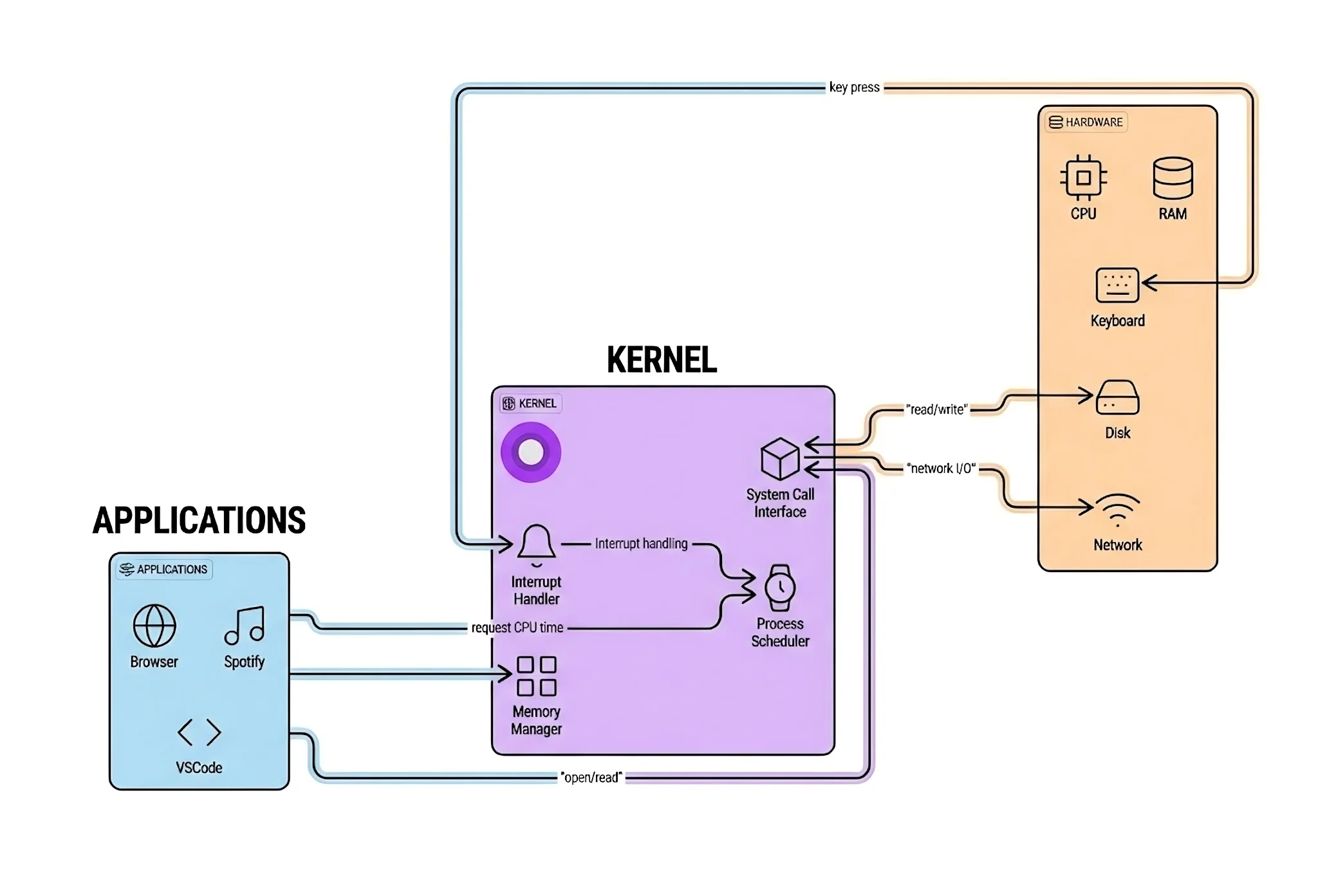
The kernel sits between applications and hardware, managing all communication and resource allocation.
Two Modes: User vs. Kernel
User mode and kernel mode are two CPU privilege levels (hardware-enforced execution states). The operating system uses them to protect the system, and the kernel controls transitions between them.
Modern CPUs support multiple privilege “rings.” In most general-purpose operating systems, the important split is:
Ring 0 — Kernel Mode:
- Unrestricted access: Can execute any CPU instruction and access any memory address
- Runs here: The OS kernel (and typically trusted device drivers)
Ring 3 — User Mode:
- Restricted access: Cannot directly access hardware or kernel memory
- Runs here: User applications (web browsers, text editors, games)
This separation is enforced by the CPU itself. If your program tries to execute a restricted instruction while in user mode, the CPU triggers an exception and the kernel can terminate your program.
This is fundamental to system security—it’s why malware can’t just take over your computer directly. It has to find vulnerabilities to escalate privileges first.
The Four Main Jobs of the Kernel
Process Scheduling
Handles creation, scheduling, and termination of processes. Acts like a traffic cop, deciding which programs run on the CPU, in what order, and for how long. This is what enables multitasking, giving you the illusion that dozens of programs are running simultaneously on a CPU with only a few cores.
The scheduler makes decisions hundreds of times per second about which process should run next. It considers factors like:
- Priority
- How long a process has been waiting
- Whether it's interactive (needs quick responses)
- CPU affinity (which core it prefers)
Memory Management
Allocates specific memory spaces to applications to prevent them from interfering with each other. Each program gets its own virtual address space, completely isolated from other programs.
What happens when things go wrong: If an app tries to access forbidden memory, the CPU raises a page fault. The kernel handles it by checking if it’s a legitimate access (maybe the page just needs to be loaded from disk) or an illegal one. Illegal accesses get the process terminated—you see this as a segmentation fault.
The kernel also manages:
- Virtual memory: Making RAM appear larger using disk space
- Page tables: Translating virtual addresses to physical ones
- Memory protection: Keeping processes separated
- Swapping: Moving inactive pages to disk
Handling System Calls
When software needs to perform restricted actions like saving a file, connecting to Wi-Fi, allocating more memory—it can’t do it directly. Instead, it makes a system call, asking the kernel to do it on its behalf.
Here’s what happens behind the scenes:
// When you write code like this...
int fd = open("file.txt", O_RDONLY);
char buffer[1024];
read(fd, buffer, sizeof(buffer));
close(fd);

// ...each of those functions triggers a system call
The system call process:
- Your program requests a system call
- CPU switches from user mode to kernel mode (mode switch)
- Kernel validates the request (security check)
- Kernel performs the operation
- Kernel returns the result
- CPU switches back to user mode
This mode switching takes time. That’s why modern systems try to batch operations when possible.
Handling Interrupts
The kernel responds to hardware signals—like a key press, mouse movement, or incoming network data—by pausing current tasks to address the immediate need.
When you press a key:
- Keyboard controller generates an interrupt
- CPU finishes its current instruction
- CPU saves current state and jumps to the keyboard interrupt handler
- Handler reads the key from the keyboard
- Handler stores it in a buffer
- Handler signals the waiting process
- CPU returns to what it was doing
This happens in microseconds, which is why your typing feels instantaneous.
When the Kernel Fails
Kernel prevents programs from accessing data they shouldn’t, protecting against crashes and data theft through “protected memory space.”
But here’s the scary part: if the kernel fails, everything fails.
This catastrophic event is called:
- Kernel Panic on macOS and Linux
- Blue Screen of Death (BSOD) on Windows
When the kernel encounters an error it can’t handle or enters an unstable state, it has no choice but to halt the system. Running with a corrupted kernel could mean data loss, security vulnerabilities, or unpredictable behavior.
Sometimes the kernel can recover. For example, if a display driver crashes, modern kernels can often restart just that driver without taking down the whole system. But for core kernel subsystems, there’s no recovery—the system must halt to prevent further damage.
Kernel Design: Where Do Services Live?
Now for the interesting part: where should OS services actually run? This is the fundamental question of kernel design, and different operating systems have very different answers.
The choice affects everything—performance, reliability, security, and maintainability.
Monolithic Kernel: Everything Under One Roof
The Philosophy
Put all operating system services together in kernel space with complete hardware access. File systems, device drivers, memory management, networking—everything runs in the kernel with full privileges.
It’s like having all city services—police, fire, utilities, waste management—in one massive building.
Examples: Linux (modular monolithic), traditional UNIX, BSD
How It Works
// In a monolithic kernel, everything runs with full privileges
struct kernel_subsystems {
    struct process_scheduler scheduler;
    struct memory_manager mm;
    struct file_system vfs;
    struct network_stack net;
    struct device_drivers drivers;
};

// Everything can talk to everything else directly
void handle_network_packet(struct packet *pkt) {
    // Direct access to all kernel subsystems
    if (scheduler.current_process->uid == 0) {
        vfs.write_to_file(pkt->data);
    }
}
All these components share the same address space and can call each other’s functions directly:
- No barriers
- No message passing
- Just direct function calls
Why It’s Good
- Performance is the biggest advantage. Components can talk to each other with simple function calls—no overhead from message passing or context switching. When the network stack needs to wake up a process waiting for data, it just calls the scheduler directly.
- Simplicity in some ways. The initial implementation is more straightforward because you don't need inter-process communication mechanisms. Everything's just C functions calling other C functions.
- Direct communication between components. The file system can directly call into memory management, device drivers can directly access hardware, and the scheduler can immediately respond to interrupts.
Why It’s Challenging
- One bug can crash everything. This is the monolithic kernel's Achilles heel. A buggy device driver with a null pointer dereference? Kernel panic. A file system with a buffer overflow? System crash. Everything runs with full privileges, so any component can bring down the whole system.
- Real-world impact: This is why a bad graphics driver can crash your entire Linux system. That driver is running in the same privileged space as the kernel itself, with full access to everything. One mistake and down it all goes.
- Large memory footprint. All kernel services must be loaded into memory, even ones you're not using. A typical Linux kernel might be 10-20 MB compressed, but when running, it can use hundreds of megabytes of RAM.
- Maintenance complexity grows. As the kernel grows, understanding all the interactions between components becomes increasingly difficult. Linux has over 27 million lines of code—managing that complexity is a massive challenge.
Linux’s Approach: Modular Monolithic
Linux technically isn’t purely monolithic—it’s modular monolithic. You can load and unload kernel modules (like device drivers) at runtime without rebooting. But when they’re loaded, they run in kernel space with full privileges, making it functionally monolithic.
# Load a kernel module
sudo modprobe nvidia

# Remove a kernel module
sudo modprobe -r nvidia

# List loaded modules
lsmod
This gives you some flexibility—you don’t need to compile every driver into the kernel—but loaded modules still run with full kernel privileges.
Microkernel: Minimal and Modular
The Philosophy
Keep the kernel tiny. Only the absolute essentials run in kernel space—typically just basic scheduling, memory management, and inter-process communication (IPC). Everything else—file systems, device drivers, network stacks—runs as separate user-space processes.
It’s like a city where the central government only handles core functions (laws, courts, military), while everything else is delegated to independent agencies.
Examples: QNX (automotive, medical devices), L4, MINIX 3, seL4
How It Works
In a microkernel, when you want to read a file, you don’t make a system call directly to the kernel. Instead, you send a message to the file server process, which is running in user space just like your application.
// Reading a file requires talking to a separate file server process
int read_file(int fd, void* buffer, size_t size) {
    struct message msg = {
        .type = FILE_READ,
        .fd = fd,
        .buffer = buffer,
        .size = size
    };

    // Send request to file server process (running in user space)
    send_message(FILE_SERVER_PID, &msg);

    // Wait for response
    receive_message(FILE_SERVER_PID, &msg);

    return msg.result;
}
The actual kernel just facilitates this message passing—it doesn’t implement file systems itself.
Why It’s Good
- Reliability is the killer feature. If a file server crashes, the kernel keeps running. You might lose access to files temporarily, but your system doesn't crash. The microkernel can even restart the failed service automatically.
- Security through isolation. Each service runs in its own protected address space. A compromised device driver can't access the file system or network stack—they're separate processes with their own memory.
- Easier to update and maintain. You can update individual services without touching the kernel. Need to upgrade your network stack? Just replace that one user-space process. No kernel recompilation required.
- Better for safety-critical systems. This is why QNX is used in medical devices, automotive systems, and industrial control—systems where failure could literally kill someone. The isolation and fault tolerance are worth the performance cost.
Why It’s Challenging
- Performance overhead is the traditional criticism. All that message passing between services has a cost. Instead of a simple function call, you're doing:
- Message construction
- Context switch to kernel
- Message routing
- Context switch to destination process
- Message processing
- Response message back
- More complex overall design. You need robust IPC mechanisms, service management, and error handling. The individual components might be simpler, but the overall system is more complex.
- Real-world impact: QNX's microkernel design is why it powers systems like the Mars rovers, medical ventilators, and modern car infotainment systems. When reliability is non-negotiable, the microkernel approach shines.
Hybrid Kernel: The Pragmatic Middle Ground
The Philosophy
Start with microkernel principles but run performance-critical services in kernel space for speed. It’s a compromise—trying to get the reliability benefits of microkernels while avoiding their performance overhead.
Examples: Windows NT, macOS (XNU kernel), BeOS
The Strategy
Hybrid kernels identify which services are:
- Performance-critical → Run in kernel space (graphics, networking)
- Less critical or isolatable → Run in user space (file systems, some drivers)
macOS’s XNU kernel, for instance, runs the Mach microkernel core but has BSD Unix services and the I/O Kit in kernel space for performance.
The Trade-off
You lose some of the microkernel’s reliability benefits—a buggy kernel-mode driver can still crash the system—but you gain performance where it matters most. It’s a practical engineering compromise based on real-world usage patterns.
Exokernel: Maximum Flexibility
The Philosophy
Expose hardware directly to applications with minimal abstraction. The kernel’s job is just to securely multiplex hardware resources. Applications (or a “library OS”) implement their own file systems, paging, and other services.
Examples: MIT Exokernel (ExOS), Nemesis
The Idea
Instead of the kernel deciding how to manage memory, schedule processes, or organize files, it just provides protected access to hardware resources. Applications get to make these decisions themselves.
Pros: Maximum performance and the ability to implement custom policies perfectly suited to your application.
Cons: Extreme complexity and portability burden—applications must do so much themselves. This approach hasn’t seen widespread adoption outside research systems.
Kernel Design Comparison
| Aspect | Monolithic | Microkernel | Hybrid | Exokernel |
|---|---|---|---|---|
| Driver location | Kernel space | User space | Both | User/LibOS |
| Fault isolation | Low | High | Medium | High |
| Performance | Fast | Slower (IPC) | Fast | Very fast |
| Reliability | Lower | Higher | Medium | Higher |
| Complexity | Growing | Higher overall | High | Extreme |
| Examples | Linux, UNIX | QNX, L4 | Windows, macOS | ExOS |
| Best for | General purpose | Safety-critical | Desktop OS | Research |