B-Trees are one of the most widely used data structures in database systems. Many open-source databases rely on B-Trees because they’ve proven effective for handling the majority of real-world use cases.
To understand why B-Trees matter, we need to first explore the disk storage(HDD/SSD) and why traditional search trees fail when storing data on disk.
Disk Storage Fundamentals
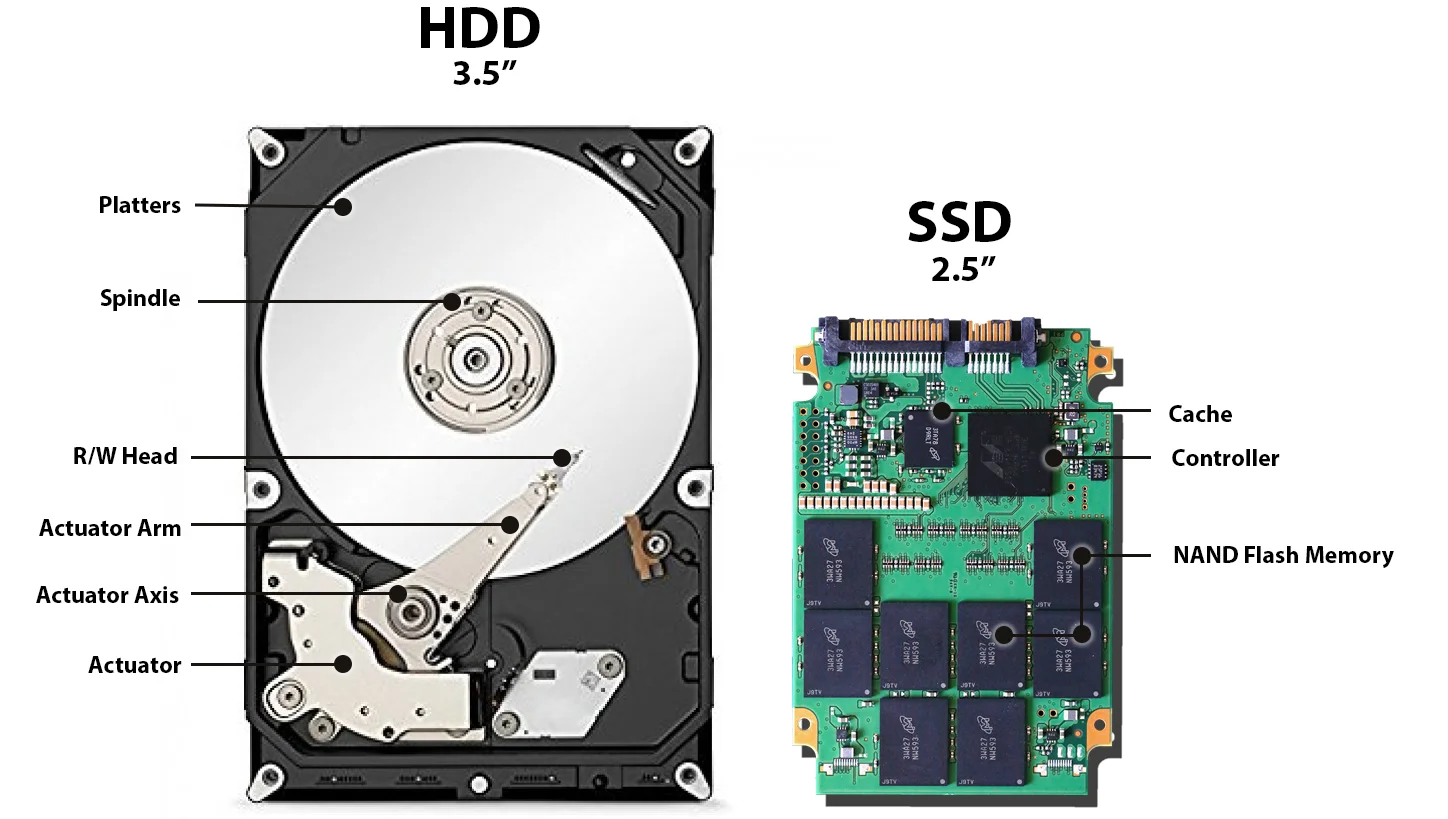
HDD and SSD. The key difference: HDD seeks require mechanical movement (slow), while SSD access is electronic (fast).
Note: Disks don’t read single bytes or nodes. They read in fixed-size blocks (typically 4 KB or 8 KB). This is the smallest unit of disk operation. Whether you request a single byte or a thousand bytes within a block, the entire block must be read from disk. This fundamental constraint shapes all storage-related algorithm design.
Hard Disk Drives (HDDs)
1. Core Mechanical Components
HDDs rely on moving mechanical parts to store and retrieve data.
- Spinning Platters: Magnetic disks that rotate continuously (typically at 5,400, 7,200, or 10,000+ RPM).
- Actuator Arm: A mechanical arm that moves back and forth across the platters.
- Read/Write Head: Located at the tip of the actuator arm, this sensor reads data from or writes data to the magnetic surface.
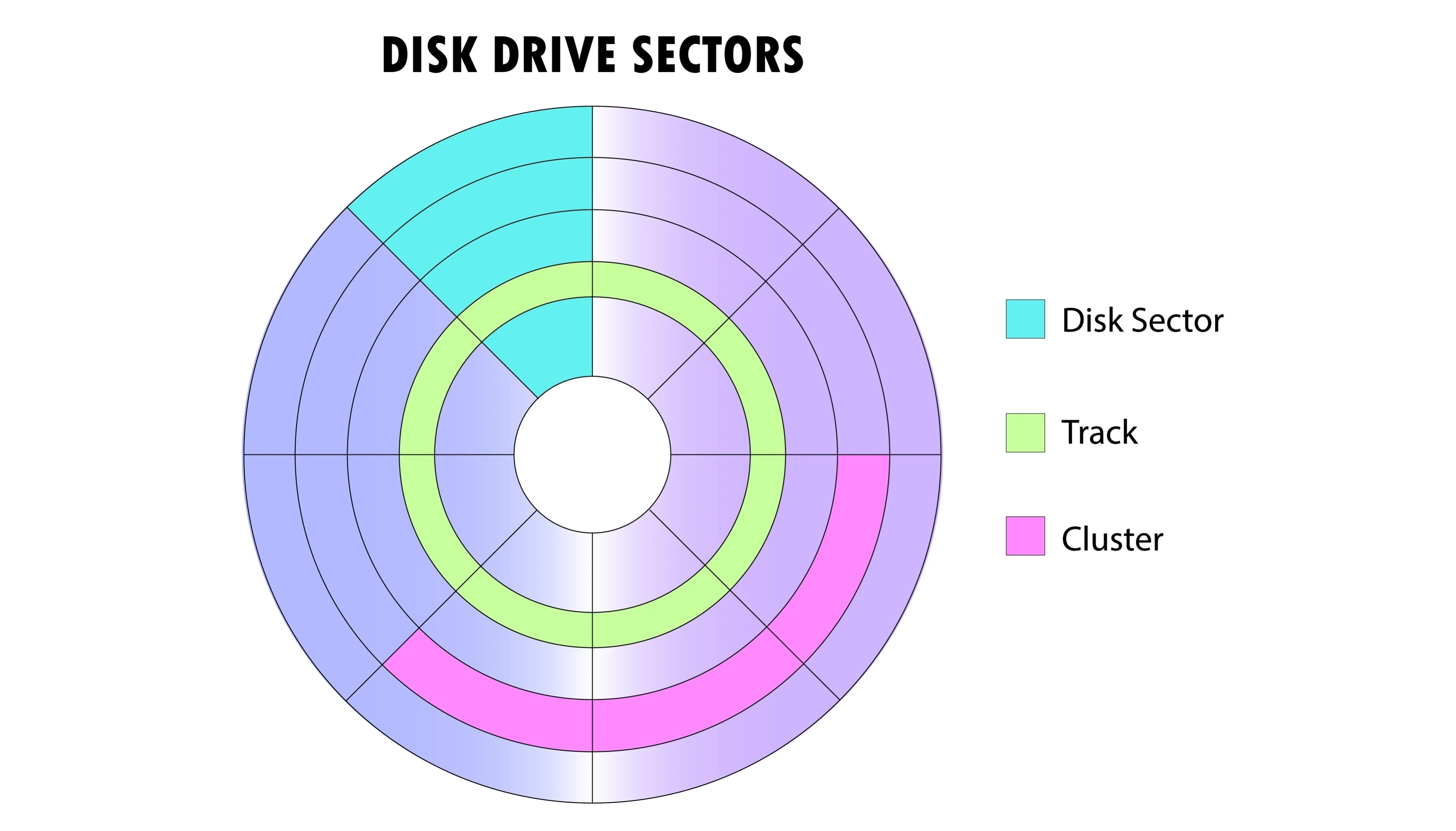
HDD storage hierarchy. Sectors (smallest units, 512B-4KB) are grouped into tracks (concentric circles at different radii). Multiple tracks form a cluster (logical unit visible to OS). The actuator arm must seek to the correct track, then wait for the platter to rotate until the desired sector is under the read/write head.
2. Key Performance Characteristics
The mechanical nature of HDDs introduces specific latency metrics that do not exist in RAM or SSDs.
- Seek Time (5–10 ms): The time required for the mechanical arm to physically move to the specific track (radius) where the data resides. This is the “heavy lifting” of HDD latency.
- Rotational Latency: The additional delay incurred while waiting for the platter to spin until the specific sector is under the read/write head.
- Sector Size: The atomic unit of transfer, typically 512 bytes to 4 KB. You cannot read/write less than a sector at a time.
The Core Problem: Seek operations are “expensive” because they require physical movement.
3. The Seek vs. Sequential I/O Trade-off
| Operation | Cost | Description |
|---|---|---|
| Random I/O (Seeking) | Expensive (High Latency) | Requires moving the arm (5-10 ms). Doing this frequently destroys performance. |
| Sequential I/O | Cheap (High Throughput) | Once the head is positioned, reading contiguous bytes takes microseconds. |
Performance Bottleneck: A single seek operation (5–10 ms) takes vastly longer than transferring a 4 KB block of data. Therefore, the goal of optimization is to amortize the cost of the seek by reading as much data as possible once the head is positioned.
4. Influence on Database Algorithms
Because traditional databases were built when HDDs were the standard, their algorithms (like B-Trees) were specifically designed to work around these mechanical limitations.
- B-Trees: These structures are “short and wide.” They minimize the height of the tree so the drive only has to “seek” a few times to find the data.
- Sequential Organization: Indexes and table scans attempt to keep related data physically close on the disk to favor sequential reading over random seeking.
Solid State Drives (SSDs)
1. Core Architecture (The Hierarchy)
SSDs use NAND Flash Memory chips with no moving parts. Instead of tracks and sectors, data is stored in a strict electronic hierarchy.
- Pages (2–16 KB): The smallest unit that can be read or written.
- Blocks (typically 64–512 Pages): The smallest unit that can be erased.
- Planes: Multiple blocks organized together to allow parallel operations.
- Die: The physical silicon chip that contains the planes.
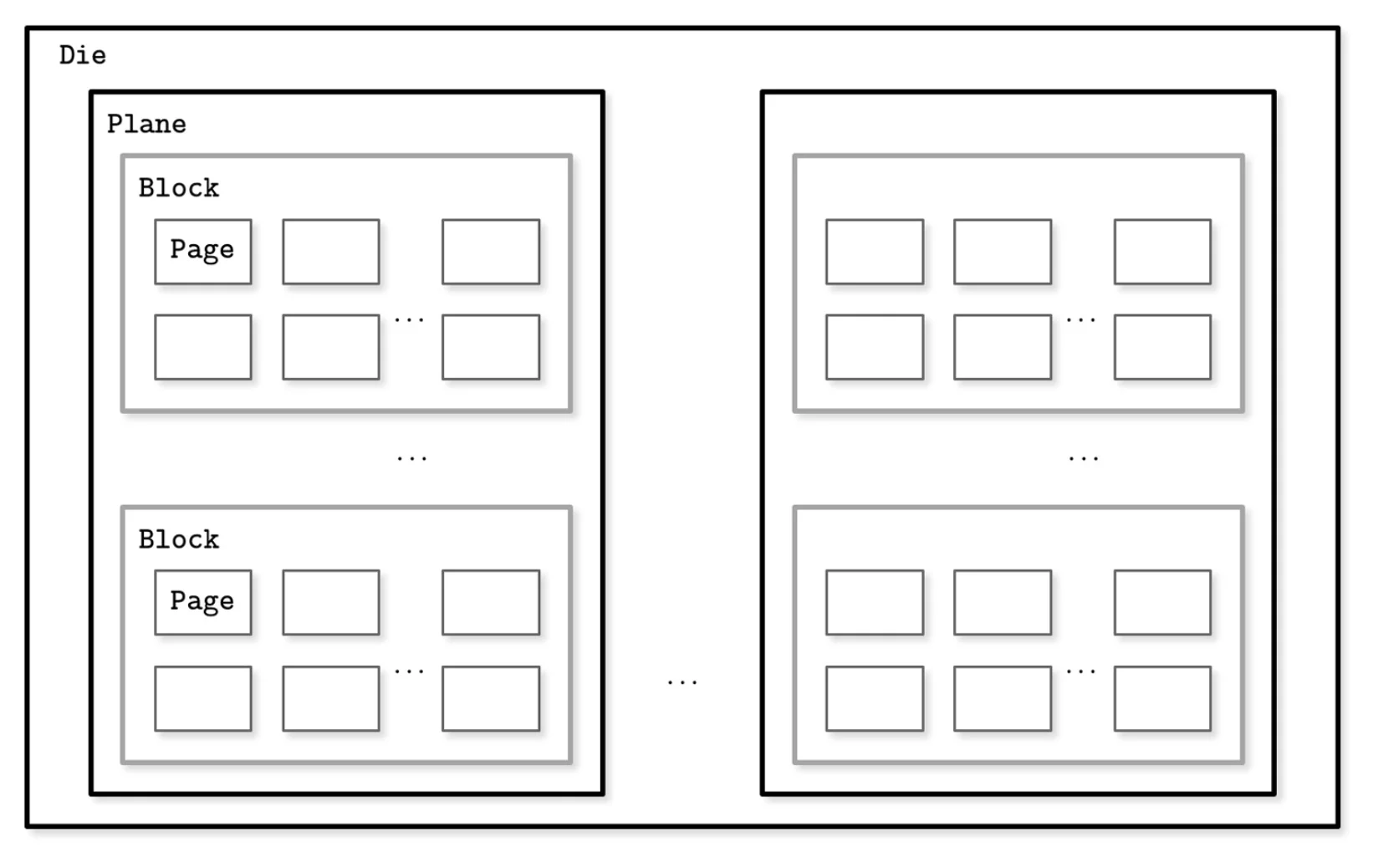
SSD storage hierarchy. Pages are the atomic unit of reading and writing, but they are grouped into Blocks. Crucially, you cannot erase a single page; you must erase the entire block (comprising hundreds of pages) at once.
2. The Read/Write/Erase Asymmetry
The physics of Flash memory introduces a unique constraint that HDDs do not have: You cannot overwrite data in place.
| Operation | Unit | Constraint |
|---|---|---|
| Read | Page (Fast) | Random access is extremely fast (0.1 ms). |
| Write | Page (Fast) | You can only write to an empty page. You cannot overwrite used pages. |
| Erase | Block (Slow) | To reclaim space, you must erase a whole block (resetting all its pages to empty). |
The Core Problem: Since you cannot overwrite a page, updates require a “Copy-on-Write” mechanism. The SSD writes the new data to a fresh page and marks the old page as “Invalid” (Garbage).
3. Key Performance Characteristics
- Access Time (~0.1 ms): purely electronic; no mechanical arm needs to move.
- No Seek Time: Random access to any memory location is nearly as fast as sequential access.
- Throughput: Extremely high (GB/s) due to internal parallelism (reading from multiple Dies simultaneously).
Garbage Collection (GC): When a block gets full of “stale” (invalid) pages, the SSD must perform maintenance. It reads the few remaining valid pages, copies them to a new block, and then erases the original block. This background work can cause performance spikes.
4. The Flash Translation Layer (FTL)
Since data is constantly moving to new physical pages (due to Copy-on-Write), the Operating System’s logical view does not match the physical reality.
- Role: The FTL is internal firmware that maps Logical Block Addresses (LBA) to Physical Page Addresses (PPA).
- Functions: It handles the complex logic of Wear Leveling (spreading writes evenly) and Garbage Collection so the OS doesn’t have to.
5. Influence on Database Algorithms (Why B-Trees?)
Even though SSDs eliminate the “Seek Time” bottleneck, B-Trees remain critical for performance.
- Minimizing I/O Operations: Reading one B-Tree node (with high fanout) is vastly more efficient than reading hundreds of small BST nodes. Every I/O request has CPU overhead, even on fast disks.
- Reducing Write Amplification: B-Trees align with SSD Page sizes (e.g., 16 KB Node = 1 SSD Page). This ensures that one logical write equals one physical write. Randomly updating tiny nodes (like in a BST) would force the SSD to copy/rewrite entire blocks constantly (High Garbage Collection pressure).
- Sequential Writes: B-Trees (and especially LSM Trees) buffer updates and write them sequentially. This helps the FTL place data in the same block, making future Garbage Collection much cleaner and faster.
Why Traditional Trees Fail on Disk
The fundamental problem: Disk I/O is expensive. Whether HDD or SSD, every read operation carries overhead. This is why traditional in-memory data structures like Binary Search Trees don’t translate well to disk storage.
Binary Search Tree (BST)
A Binary Search Tree (BST) is an in-memory data structure optimized for fast CPU access. Each node contains a key, a value, and two child pointers. Keys are ordered: all keys in the left subtree are smaller, and all keys in the right subtree are larger.
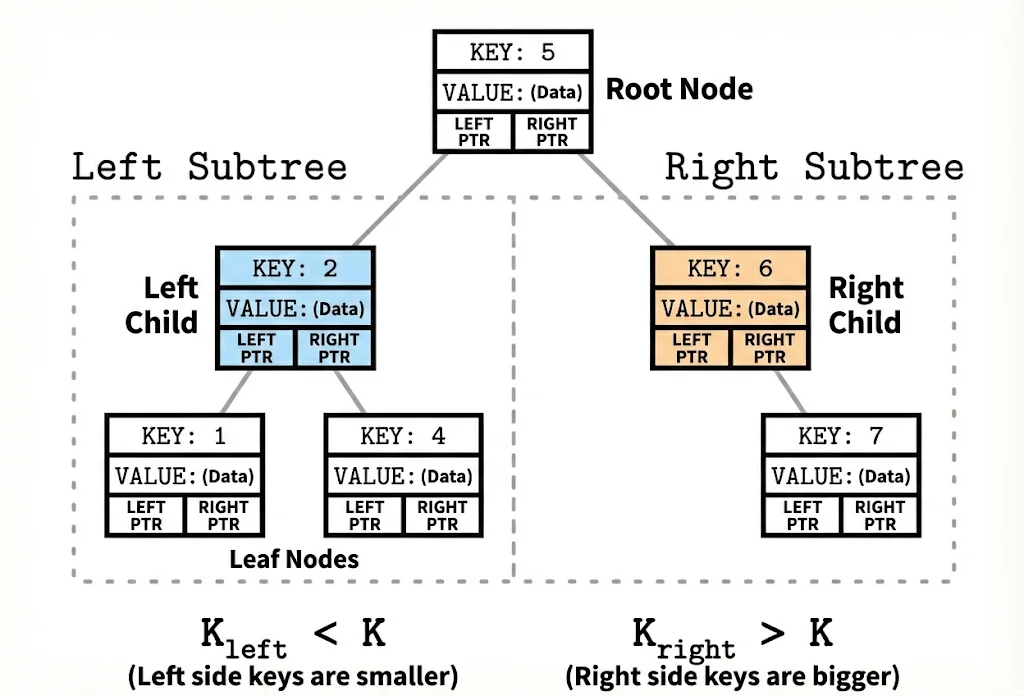
A Binary Search Tree.
BSTs work beautifully in RAM because accessing any memory location takes roughly the same time. But, disk storage changes everything.
Why BSTs Fail on Disk: Three Critical Problems
1. Poor Spatial Locality (Random Scattering)
When nodes are added over time, they’re scattered across different disk locations. A parent node might be stored at disk address 100, its left child at address 5000, and its right child at address 20.
Even though these nodes are logically connected, physically they’re far apart. To traverse from parent to child requires the disk’s mechanical arm to physically move to a new location—a costly seek operation. With a tall BST, you might perform 20 seeks just to find one piece of data.
2. Wasted Block Transfers (Low Fanout)
A BST node is tiny, maybe just a few bytes. When you request one node, the disk is forced to read an entire 4 KB or 8 KB block, but most of it is wasted space. You pay the cost of transferring the whole block to get just one node’s worth of information.
This matters because disks don’t read single bytes or nodes—they read in fixed-size blocks. This is the smallest unit of disk operation. Whether your BST node occupies 100 bytes or the entire block is only partially filled, the whole block transfer cost must be paid.
3. Excessive Height (Tree is Too Tall)
A BST has a fanout of only 2 (each node has at most 2 children). To store millions of items, the tree must be very tall. A tall tree requires many levels, and each level means at least one seek operation.
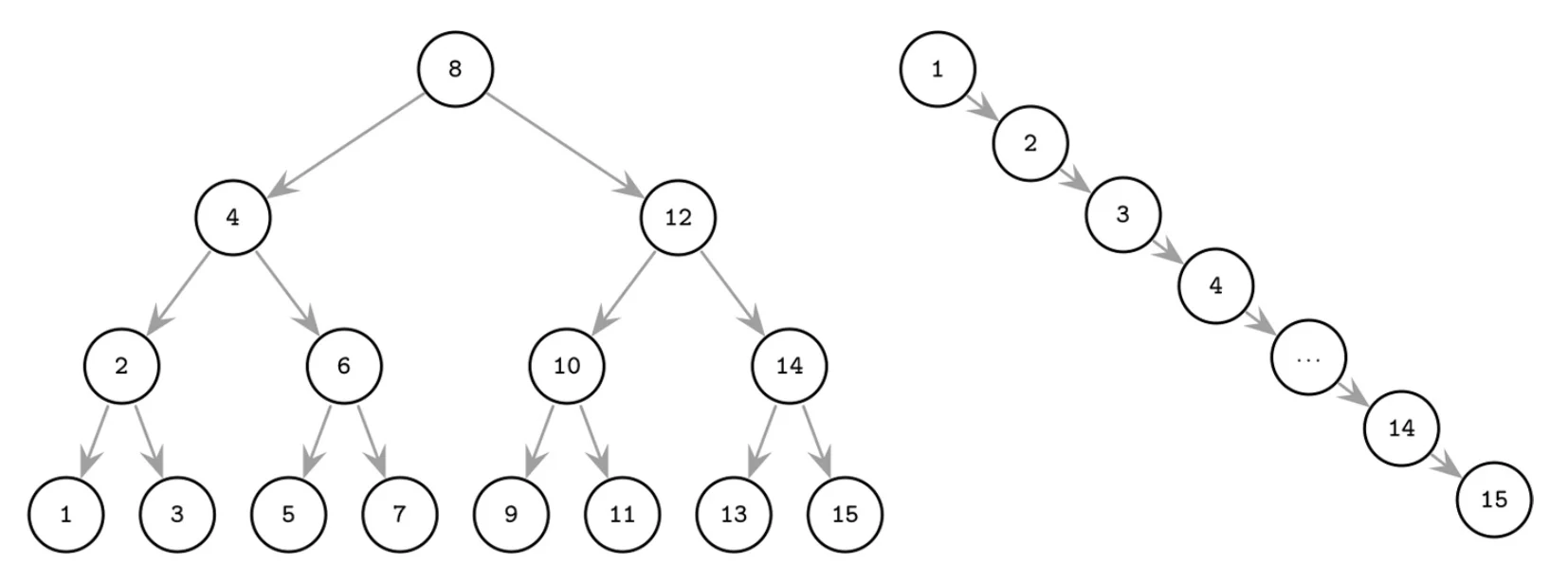
Left: A balanced BST minimizes height. Right: An unbalanced/degenerate BST becomes a linked list, requiring one seek per item. Each additional level adds another expensive disk seek.
For example:
- A BST with 4 billion items needs roughly 32 levels
- Finding one item means 32 disk seeks
- Each seek takes 5-10 milliseconds on a traditional hard drive
- Total time: hundreds of milliseconds just for one lookup
B-Trees: The Backbone of Disk-Based Storage
A B-Tree is a self-balancing search tree specifically engineered for systems where data resides on disk. Unlike binary trees, B-Trees are designed to minimize disk I/O operations by maximizing the amount of data retrieved in a single read.
Core Principles
- High Fanout: Nodes are wide, storing many keys and child pointers.
- Low Height: The tree remains flat; even with billions of records, the depth is rarely more than 3 or 4.
- Self-Balancing: Operations (splits and merges) automatically keep the tree height uniform.
1. Node Structure & Constraints
For a B-Tree of order m:
| Property | Rule / Formula |
|---|---|
| Max Child Pointers | m |
| Max Keys per Node | m - 1 |
| Min Keys per Node | ⌈m/2⌉ - 1 (except root) |
| Root Constraints | Can have as few as 1 key |
Why these rules matter
- Balanced Growth: Ensures the tree stays chemically balanced.
- Space Efficiency: Nodes are guaranteed to be at least ~50% full, preventing wasted disk space.
- Consistent Height: All leaf nodes are always at the exact same depth.
Real-world Scale: A standard 4 KB disk block typically holds an order m ≈ 256-512. This means a single node contains hundreds of keys.
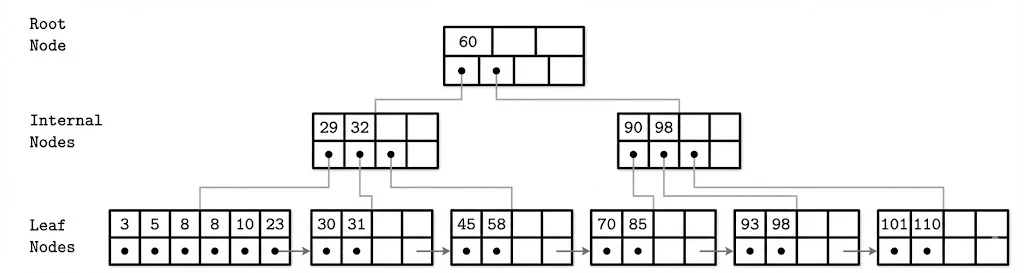
A B-Tree example showing the Root Node (60), Internal Nodes (29-32, 90-98), and Leaf Nodes with sibling pointers. Each level demonstrates how separator keys guide the search downward, and how leaf nodes are linked for efficient range scans.
2. Disk Efficiency Strategy
The B-Tree’s “superpower” is its alignment with hardware architecture.
- Hardware Match: The node size is tuned to match the underlying disk block size (usually 4 KB).
- Single Read: One disk I/O fetches a whole node, providing hundreds of navigation keys at once.
- Massive Scale:
- Level 1 (Root): 1,000 keys
- Level 2: 1,000,000 keys
- Level 3: 4,000,000,000 keys
- Result: You can find one item among 4 billion with just 3 disk seeks.
3. B-Tree vs. B⁺-Tree
While often used interchangeably in conversation, modern databases (MySQL, PostgreSQL) almost exclusively use the B⁺-Tree variant.
| Feature | Standard B-Tree | B⁺-Tree (Industry Standard) |
|---|---|---|
| Data Storage | Stored in Root, Internal, or Leaf nodes | Stored only in Leaf nodes |
| Internal Nodes | Contain keys and data | Contain only separator keys (guides) |
| Leaf Linking | No standard links | Linked list of leaves (Sibling Pointers) |
| Range Scans | Slower (requires traversing up/down) | Fast (traverse the linked leaves) |
4. Key Operations
Lookup (Search)
Searching is a combination of disk seeks (to load nodes) and in-memory binary search (to process nodes).
- Start at Root.
- Perform Binary Search inside the node to find the correct child pointer.
- Follow pointer to the next level.
- Repeat until the Leaf is reached.
Complexity Analysis:
- Disk Seeks: logₘ(N) (where m is keys per node, N is total items).
- Comparisons: log₂(m) within each node.
Range Queries
- Step 1: Use Lookup to find the starting key.
- Step 2: Follow sibling pointers across the leaf level to collect all subsequent keys.
- Benefit: Eliminates the need to jump back up to parent nodes.
Insertion (The “Split”)
When a new key is added, the tree maintains balance by splitting full nodes rather than growing deeper immediately.
-
Locate target leaf.
-
Insert key in sorted order.
-
Check for Overflow: If keys > m - 1:
- Split the node into two.
- Promote the middle key to the parent node.
-
Recursive Check: If the parent is full, split the parent. If the Root splits, the tree height grows by 1.
Deletion (The “Merge”)
When a key is removed, the tree prevents nodes from becoming too empty (“underflow”).
-
Remove the key.
-
Check for Underflow: If keys < ⌈m/2⌉ - 1:
- Merge: Combine with a sibling if they fit into one node.
- Rebalance: Borrow a key from a sibling if a merge isn’t possible.
-
Demotion: If the root becomes empty (after merging children), the tree height shrinks by 1.