Process Hierarchy and Family Relationships
Processes don’t exist in isolation. Every process on a Unix system has a parent and that parent had a parent, and so on, all the way back to a single root process that the kernel created at boot time.
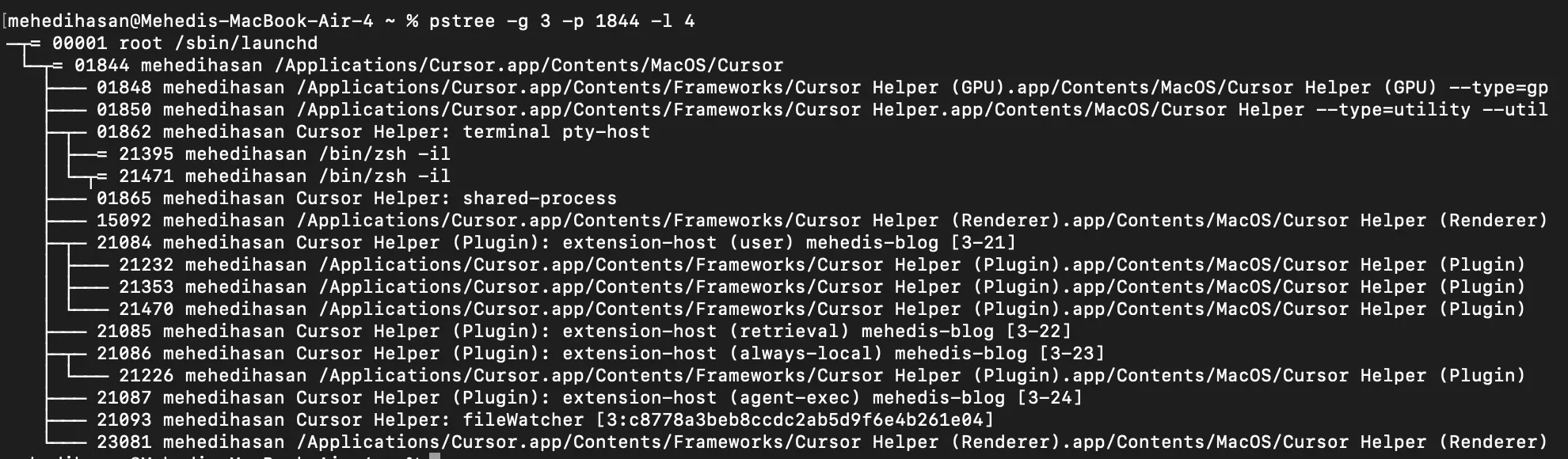
The process tree while I was writing this blog in Cursor IDE.
That screenshot is a real pstree output — my machine while I was writing this post. What you’re looking at is Cursor IDE spawning a family of specialized child processes: a GPU helper, a renderer, a shared-process coordinator, and an extension host that itself spawned more children for plugins and file watching. Every line in that tree is a parent-child relationship created by a single system call: fork().
Every Process Has a Parent
When a process calls fork(), it creates a child. The child gets its own PID (Process ID), but it also carries a PPID (Parent Process ID) that permanently records who created it.
ps -o pid,ppid,commRunning that while Cursor is open shows something like this:
  PID  PPID COMMAND
    1     0 launchd
 1844     1 Cursor
 1850  1844 Cursor Helper (GPU)
 1860  1844 Cursor Helper (utility)
 1865  1844 Cursor Helper: shared-process
 1896  1844 Cursor Helper (Renderer)
 3022  1844 extension-host
21903  3022 Cursor Helper (Plugin)
21953  3022 Cursor Helper (Plugin)
22026  3022 Cursor Helper (Plugin)
21226  3022 Cursor Helper (Plugin)
23993  3022 FileWatcher
23081  3022 Cursor Helper (Renderer)
Read this bottom-up: FileWatcher was started by the extension-host, which was started by Cursor, which was started by launchd (PID 1). That chain doesn’t break — it goes all the way to the root.
The full picture looks like this:
launchd (PID 1)
└── Cursor (PID 1844)
    ├── Cursor Helper GPU (PID 1850)
    ├── Cursor Helper utility (PID 1860)
    ├── Cursor Helper: shared-process (PID 1865)
    ├── Cursor Helper (Renderer) (PID 1896)
    └── extension-host [mehedis-blog] (PID 3022)
        ├── Cursor Helper (Plugin) (PID 21903)
        ├── Cursor Helper (Plugin) (PID 21953)
        ├── Cursor Helper (Plugin) (PID 22026)
        ├── Cursor Helper (Plugin) (PID 21226)
        ├── FileWatcher (PID 23993)
        └── Cursor Helper (Renderer) (PID 23081)
Every leaf is a process you can interact with or kill. Every branch is a parent-child relationship created by fork().
The Root Process: PID 1
At the root of every Unix process tree sits a single process the kernel creates directly — on Linux it’s systemd (or the older init), on macOS it’s launchd. Either way, it’s always PID 1.
PID 1 is special:
- It’s the first user-space process the kernel spawns after boot
- It never dies under normal circumstances and can’t be killed with a regular signal
- Every other process on the system is ultimately a descendant of it
The chain from kernel boot to your editor looks roughly like this:
[kernel] boots
    └── launchd spawned directly by kernel (PID 1)
            └── Cursor launched by launchd (PID 1844)
                    └── extension-host forked by Cursor (PID 3022)
                            └── FileWatcher forked by extension-host (PID 23993)
You’re four fork() calls deep just to get a file watcher running. That chain is always there, even if you never think about it.
The difference between traditional init and modern systemd/launchd is startup strategy. Traditional init runs services sequentially via shell scripts. Systemd and launchd start services in parallel and track dependencies between them — which is why modern systems boot significantly faster.
What Happens When a Parent Dies?
When a parent process exits while its children are still running, those children become orphaned. The OS can’t leave them parentless — the process table requires every process to have a valid PPID.
So the kernel reparents them to PID 1. Automatically, silently.
pid_t child = fork();

if (child == 0) {
    sleep(2);
    // By the time we wake up, parent is gone
    printf("My PPID is now: %d\n", getppid());  // prints 1
} else {
    printf("Parent exiting\n");
    exit(0);  // Parent exits immediately
}
Time 0: Cursor (PID 1844) forks extension-host (PID 3022)
extension-host's PPID = 1844
Time 1: Cursor crashes unexpectedly
extension-host and its plugin children are now orphaned
Time 2: Kernel reparents extension-host to launchd
extension-host's PPID = 1PID 1 then takes responsibility for calling wait() on these adopted orphans when they eventually exit, preventing them from becoming zombies. This is one of the quiet but essential jobs launchd and systemd do constantly.
Process Groups and Sessions
Beyond the parent-child tree, the OS organizes processes into groups and sessions for job control purposes.
A process group is a set of related processes that receive signals together. When you hit Ctrl+C in a terminal, you’re not killing one process — you’re sending SIGINT to the entire foreground process group.
A session is one level up — it groups all the process groups associated with a terminal connection:
Terminal Session (/dev/pts/0)
│
├── Foreground Process Group
│   ├── bash (session leader)
│   └── npm run dev
│
└── Background Process Group
    └── FileWatcher (PID 23993)
The session leader (usually your shell) is the process that opened the terminal. When you close the terminal, SIGHUP gets sent to the session leader and cascades through its group. This is why background processes can outlive your session if they explicitly detach from it — which is exactly what nohup and daemon processes do.
Why This Structure Matters
The hierarchy isn’t bookkeeping detail — it has real operational consequences.
Isolation through separation. Cursor doesn’t run everything in one process. It forks a dedicated GPU process (PID 1850), a dedicated renderer (PID 1896), and separate plugin processes (PIDs 21903–21226). If the renderer crashes, Cursor doesn’t crash. The OS’s process boundary provides the isolation.
Signal propagation. Signals sent to a process group reach all members at once. Ctrl+C works because of process groups. Killing a parent doesn’t automatically kill its children, but killing a process group does.
Resource cleanup. When a process exits, the OS walks its children. Orphans get reparented to init. Open file descriptors get closed. Memory gets reclaimed. The tree structure makes this cleanup tractable.
Supervision. Because Cursor is the parent of the extension-host (PID 3022), it can call wait() to detect if the extension-host dies — and restart it. If the FileWatcher (PID 23993) crashes, the extension-host detects it and spawns a replacement. The parent-child relationship is what makes this supervision possible.
Cursor (PID 1844) — supervisor
    └── extension-host (PID 3022) — supervisor
            ├── Plugin (PID 21903) — supervised
            ├── Plugin (PID 21953) — supervised
            └── FileWatcher (PID 23993) — supervised
Each level can monitor and restart the level below it. This is why modern applications are robust to individual component crashes without losing your entire session.
Unix vs Windows
Windows takes a notably different approach. Process creation via CreateProcess() doesn’t establish the same kind of strong parent-child bond. The relationship exists at creation time, but it’s not enforced — a parent handle can be closed and the child continues completely independently with no reparenting involved.
This makes Windows processes more independent by default. There’s no init-equivalent that adopts orphans. Building supervision hierarchies like Cursor’s model requires more explicit work on Windows — you can’t rely on the OS’s built-in tree semantics.
Neither approach is strictly better. Unix’s tight hierarchy makes supervision and signal propagation elegant. Windows’s looser coupling fits a model where applications are expected to be self-contained.
Exploring the Tree
A couple of commands make this hierarchy visible:
# Show the process tree in ASCII format (macOS requires brew install pstree)
pstree

# Show with PIDs
pstree -p

# Filter to a specific process
pstree -p $(pgrep -x Cursor | head -1)

# Show full process list with parent relationships
ps --forest          # Linux
ps -A -o pid,ppid,comm  # macOS
Running pstree -p for Cursor produces exactly what you see in the screenshot at the top — the full lineage from launchd (PID 1) down through every helper, renderer, plugin, and file watcher. That single tree is your entire running application, organized by who created what.