The Great Mental Model Shift
When people first encounter MongoDB, they often struggle because they’re still thinking in “Excel sheets.” Years of working with rows and columns make it hard to adjust when someone hands you a filing cabinet and says, “Store whatever you want, however you want.”
Your brain rebels: “But where are the columns? How do I JOIN this? This is chaos!”
Let’s fix that mental model right now.
The Excel Sheet (SQL)
SQL databases are like Excel spreadsheets on steroids. Everything must fit into rigid rows and columns:
-- Users Table
| id | name    | email           |
|----|---------|-----------------|
| 1  | Mehedi  | me@example.com  |
| 2  | Hasan   | h@example.com   |

-- Posts Table
| id | user_id | title        | content    |
|----|---------|--------------|------------|
| 1  | 1       | "Hello World"| "My first..|
| 2  | 1       | "MongoDB"    | "Let's talk|
| 3  | 2       | "React"      | "Building..|

-- Comments Table
| id | post_id | user_id | comment      |
|----|---------|---------|--------------|
| 1  | 1       | 2       | "Great post!"|
| 2  | 1       | 1       | "Thanks!"    |
To get a post with its author and comments, you need a JOIN operation:
SELECT
    p.title,
    u.name as author,
    c.comment
FROM posts p
JOIN users u ON p.user_id = u.id
JOIN comments c ON c.post_id = p.id
WHERE p.id = 1;
Mental Model: Imagine three separate filing cabinets. To get the full story, you have to run between all three, grab pieces of paper, and tape them together. This gets expensive when you have millions of records.
The Filing Cabinet (MongoDB)
MongoDB is like a physical filing cabinet where each folder can contain whatever makes sense.
// One document in the "posts" collection
{
  _id: ObjectId("..."),
  title: "Hello World",
  content: "My first post about...",
  author: {
    name: "Mehedi",
    email: "me@example.com"
  },
  comments: [
    {
      user: "Sarah",
      comment: "Great post!",
      date: ISODate("2025-12-31")
    },
    {
      user: "Mehedi",
      comment: "Thanks!",
      date: ISODate("2025-12-31")
    }
  ],
  tags: ["mongodb", "tutorial"],
  publishDate: ISODate("2025-12-31"),
  viewCount: 1247
}
The “Aha!” Moment
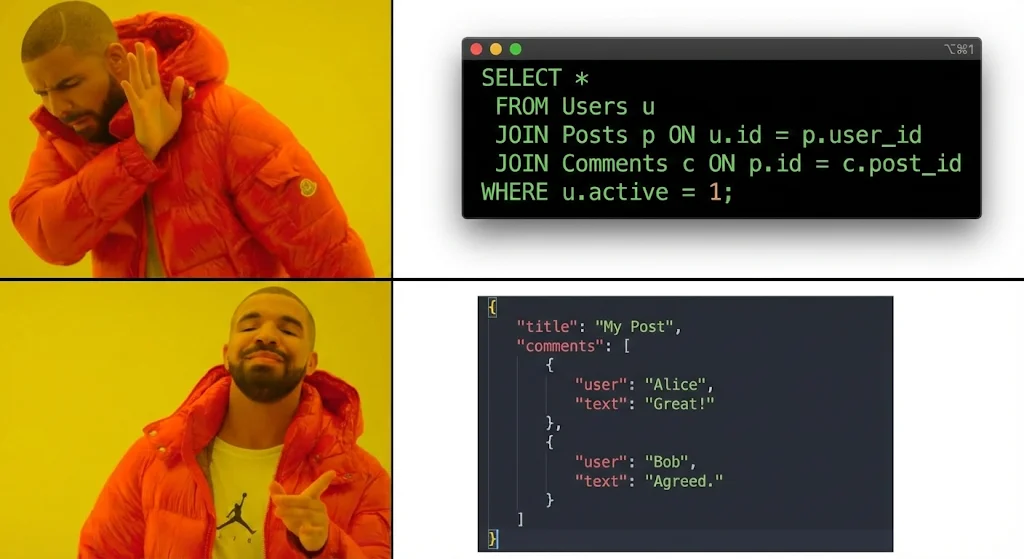
SQL requires multiple JOINs across tables, while MongoDB embeds related data in a single document.
SQL approach: Multiple queries + JOIN
// Query 1: Get the post
const post = await db.query('SELECT * FROM posts WHERE id = ?', [1]);

// Query 2: Get the author
const author = await db.query('SELECT * FROM users WHERE id = ?', [post.user_id]);

// Query 3: Get comments
const comments = await db.query('SELECT * FROM comments WHERE post_id = ?', [1]);

// Now stitch it all together...
const result = {
  ...post,
  author: author,
  comments: comments
};
MongoDB approach: One query
const post = await db.posts.findOne({ _id: ObjectId("...") });
// Done. You have everything.
Why This Mental Model Matters
Data Locality
- Excel Sheet: Data is scattered across multiple tables. You need to “walk around” to collect pieces.
- Filing Cabinet: Related data lives together. One folder, everything inside.
JOIN Performance
- Excel Sheet: JOINs get expensive. Joining three tables with millions of rows? Your database sweats.
- Filing Cabinet: No JOINs needed. Just grab the folder.
Schema Flexibility
- Excel Sheet: Every row must have the same columns. Adding a new column affects every row.
- Filing Cabinet: One folder might have photos, another might have contracts. Whatever makes sense.
The Data: BSON vs. JSON
You might think MongoDB stores data as JSON (JavaScript Object Notation). It doesn’t. MongoDB uses BSON (Binary JSON).
Why the difference?
- JSON is text-based and easy for humans to read, but slow for computers to scan and limited in data types.
- BSON is binary, optimized for speed, and supports a richer set of data types.
| Feature | JSON (Text) | BSON (Binary) |
|---|---|---|
| Speed | Slow (reads every character) | Fast (uses length prefixes to skip data) |
| Space | Inefficient for numbers | Efficient, especially for numbers |
| Types | Limited (String, Number, Bool) | Rich (Date, ObjectId, Binary, Decimal128) |
In short: BSON is what makes MongoDB fast and flexible, supporting types and operations that plain JSON can’t.
Example: Flexible Documents
// This is valid MongoDB data
{
  name: "Mehedi",
  skills: ["JavaScript", "MongoDB", "Node.js"],
  experience: {
    years: 5,
    level: "Senior",
    companies: ["TechCorp", "StartupXYZ"]
  },
  isActive: true
}

// This is also valid in the same collection
{
  name: "Sarah",
  skills: ["React", "CSS"],
  bio: "I love building UIs",
  portfolio: "https://sarah.dev",
  socialMedia: {
    twitter: "@sarah",
    github: "sarahcodes"
  }
}
Try doing that in Excel. You can’t. Every row must have the same columns.
When to Use Each Mental Model
Use the Excel Sheet (SQL) When:
- You have strict, unchanging data relationships
- You need complex queries across multiple entities
- Data integrity is more important than flexibility
- You’re building accounting systems or inventory management
Use the Filing Cabinet (MongoDB) When:
- You need flexible schemas
- You often read data together (user + profile + preferences)
- You’re building content management, social media, or catalogs
- You want to avoid complex JOINs
The Real-World Test
Ask yourself: “How do I usually need this data?”
- Blog System: Do you usually load a post with its author and comments together? → Filing Cabinet
- E-commerce Orders: Do you need to track inventory separately from orders? → Excel Sheet
- User Profiles: Do you load user data with their preferences and settings? → Filing Cabinet
- Financial Transactions: Do you need strict relationships between accounts and transactions? → Excel Sheet
Interview Insights: Key Differences That Matter
Q: What are the key differences between MongoDB and relational databases?
| Aspect | MongoDB | SQL |
|---|---|---|
| Data Model | Document-based (JSON/BSON) | Table-based (rows/columns) |
| Schema | Flexible, schema-less | Rigid, predefined schema |
| Joins | Embed data or reference | Native JOIN operations |
| Relationships | Embedding or references | Foreign keys |
| Scalability | Horizontal (sharding) | Vertical (bigger servers) |
| ACID Transactions | Multi-document support (v4.0+) | Full ACID support |
Takeaway: MongoDB shines when your data is nested and naturally hierarchical. SQL excels when your data is relational and structured.
Q: What is BSON and why does MongoDB use it?
Mental Model: BSON is JSON’s “binary twin.” It’s like taking a filing folder’s label (JSON text) and encoding it in a compact binary format that MongoDB’s driver understands instantly.
// JSON (What you write)
{
  name: "Mehedi",
  age: 28,
  email: "mehedi@example.com"
}

// BSON (What MongoDB stores and transmits)
// Same data, but optimized for storage and speed
// Includes type information (28 is stored as Int32, not string "28")
Why BSON instead of plain JSON?
- Type safety: BSON knows Int32 vs Int64 vs Float vs String
- Smaller size: Binary encoding is more compact than text
- Faster parsing: No text parsing overhead
- Ordered keys: Maintains field insertion order
- Extended Types: Supports Date, ObjectId, Binary, etc.
The “Gotcha” Warning
The filing cabinet is flexible, but it can become a junk drawer without discipline:
// This is chaos
{
  name: "User",
  data: "random stuff",
  info: {
    more: {
      nested: {
        chaos: ["help", "me"]
      }
    }
  }
}
This is why Mongoose exists it’s the sheriff that keeps your filing cabinet organized.